
Bottom line: DME workflow management is how an order moves from intake to billing, and how staff know what to work next.
When that movement depends on someone remembering to update a status, the queue stops reflecting reality. Rules-based routing advances clean orders on their own and flags the exceptions before they reach billing.
What is DME Workflow Management?
DME workflow management is the system of steps, statuses, and handoffs that carries an order from the moment it arrives to the moment it's billed and paid. It's how intake passes an order to fulfillment, how fulfillment passes it to billing, and how a manager sees what's stuck and where. In most operations it runs on work-in-progress states inside the core system, usually Brightree, with staff moving orders between queues as they work them.
Done well, workflow management means the right order reaches the right person at the right time with the information needed to act. Done manually, it means people spend their day opening worklists, checking fields, and deciding what to touch next.

Why Manual DME Workflow Management Breaks Down at Volume
Manual workflow management holds up at low volume and strains as orders climb. Every order needs a person to check its status, confirm the last step was done, and move it forward. That works when there are dozens of orders. It doesn't when there are thousands, because the checking doesn't scale and the queue drifts from the truth.
The core problem is that a WIP state records what someone last clicked, not what's actually true about the order. An order marked ready to bill may be missing a document. An order sitting in an intake queue may already be complete and just waiting for someone to notice. The status looks organized either way. Staff end up re-checking orders that are already fine and missing the ones that aren't, and defects ride the workflow forward until billing finds them at the payer.
What Breaks When the Queue Doesn't Reflect Reality
When status depends on manual updates, a few predictable failures follow, and they compound as volume grows.
- Clean orders wait in a queue because no one has moved them, adding days to fulfillment
- Incomplete orders advance because a status was updated before the work was verified
- Staff spend time triaging every order instead of working the ones that actually need attention
- Orders stall between handoffs when the next person doesn't know they're waiting
- Managers lose trust in the queue, so they build side spreadsheets to track what's real
Each of these is a manual touch that adds cost without adding value. The order didn't need a human to look at it. It needed the workflow to know whether it was ready.
How Rules-Based Automation Manages the Workflow
Rules-based automation turns workflow management from a set of manual status updates into an engine that moves orders on validated conditions. It doesn't replace your system or require leaving Brightree. It works on top of the WIP states you already use, checking each order against the rules and advancing only the ones that pass.
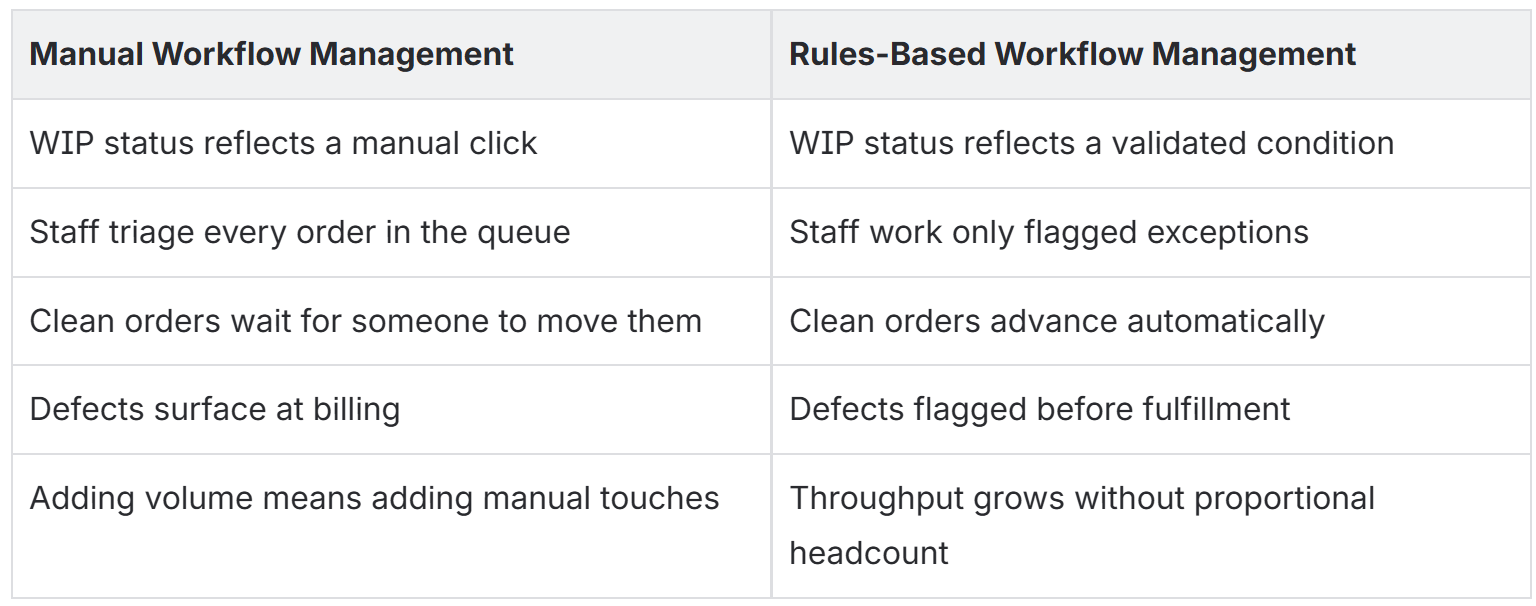
In practice, the automation confirms an order's documentation is complete, checks eligibility and authorization, matches the item against payer rules, and moves the order to the next state only when those conditions are met. Anything that fails routes to an exception queue with the specific gap attached, so staff open a worklist of real problems instead of a pile they have to sort themselves. The order advances on what's true, not on what someone remembered to click.
The result is capacity. Clean orders flow without a person touching them, and staff spend their time on the exceptions that need judgment, referral-source follow-up, and patient-facing work. The same team manages more volume because routine movement stops landing on a desk. A status tracker becomes a workflow engine only when the state changes are tied to validated conditions instead of a manual click.
DME Workflow Management FAQs
What is the difference between WIP tracking and workflow management?
WIP tracking records what state an order is in. Workflow management moves the order between states and decides what staff work next. Tracking tells you where an order sits; management gets it to the next step, and automation makes that movement depend on validated conditions rather than manual updates.
Does automating workflow management mean replacing Brightree?
No. Rules-based routing and exception management run on top of your current Brightree WIP states as a layer that extends them, not a platform swap.
How does automated workflow management reduce denials?
By checking documentation, eligibility, authorization, and payer rules before an order advances, so defects are caught and routed at intake instead of surfacing as denials after billing.
Can a smaller DME team benefit from this?
Yes. Smaller teams feel manual touches most, since every order competes for limited staff time. Automating routine movement frees that time for exceptions and patients.
Where to Start
You don't need to rebuild the whole workflow at once. Start where orders stall.
- Identify the handoffs and queues where orders wait longest or get reworked most.
- Review 60 to 90 days of WIP and denial data to find the top patterns by volume and revenue.
- Trace each stall or defect to the manual check that was supposed to catch it.
- Configure rules-based validation at that point so orders advance only when the condition is met.
- Tie WIP state changes to those validated conditions so status reflects reality.
- Route failures to an exception queue with the specific gap attached.
- Track cycle time and denials, then expand once the rules hold.
DME workflow management is about making the queue tell the truth, so clean orders move on their own and staff work only what actually needs them.
