
Bottom line: DME medical necessity is the documented proof that a patient's condition requires the equipment being billed. Payers deny claims when that proof is missing, incomplete, or contradicted by the chart.
The fix is upstream.
Validate the order, the diagnosis, and the supporting notes at intake so billing submits claims that already meet coverage criteria.
What is DME Medical Necessity?
DME medical necessity means the equipment being ordered is reasonable and necessary to treat the patient's diagnosed condition, and the record proves it.
It is not a single document.
It is a set of matching pieces: a valid order from the treating practitioner, a qualifying diagnosis, chart notes that describe the clinical need, and any item-specific requirements the payer attaches to that HCPCS code.
The important word is "matching." A payer checks that all the documents agree. The order, the notes, and the coded diagnosis all have to point to the same clinical picture. When they don't, the claim looks unsupported even if every form is technically present.
Where Medical Necessity ACTUALY Gets Decided
Most teams treat medical necessity as a billing question. By the time billing touches the order, the answer is already set.

The equipment shipped. The encounter happened. The notes say what they say.
Billing can format the claim, but it can't create documentation that intake never captured.
That is why denials for medical necessity are usually intake failures wearing a billing costume.
Common upstream gaps include:
- An order missing a required element, such as the item, the treating practitioner's signature, or the date
- Chart notes that name the diagnosis but never describe why the equipment is needed
- A diagnosis code that doesn't meet the payer's coverage policy for that item
- A face-to-face encounter requirement that was never met or never documented
- Missing prior authorization when the payer requires it before fulfillment
Each of these is fixable at intake and expensive to fix after delivery (e.g. a missed authorization discovered after the equipment is in the patient's home can turn into difficult-to-recover revenue).
What Documentation Supports Medical Necessity?
Requirements vary by payer and by item, so treat the following as the general shape rather than a universal checklist. Confirm the specific rules for each payer and HCPCS code before you rely on them.
- A valid, complete order from the treating practitioner
- A qualifying diagnosis that meets the payer's coverage criteria for the item
- Chart notes or a clinical evaluation that document the condition and the need
- Item-specific proof, such as compliance data for PAP or qualifying lab values for certain items
- Prior authorization or a coverage determination when the payer requires one
- Proof of delivery once the item is dispensed
Let’s be honest here… the recurring failure isn't that teams don't know these categories exist.
The issue is that a human is checking each one by hand, order after order, and the checks are only as consistent as the person doing them on a busy day.
Why Manual Medical Necessity Review Breaks Down at Volume
Manual review typically works until volume climbs. Then it, well, doesn't.
Every order needs someone to open the chart, read the notes, compare the diagnosis against the coverage policy, and confirm the order is complete. That's slow, and it's uneven. Two staff members reviewing the same order can reach different conclusions, and neither has time to check every field on every order when the queue is full.
The result is a queue that looks organized but hides risk. Orders move forward because someone clicked a status, not because the documentation was verified. The defect stays invisible until the payer finds it and denies the claim weeks later.
How Rules-Based Automation Validates Medical Necessity
Rules-based automation applies the same criteria to every order, at intake, before the order advances. It doesn't replace clinical judgment. It enforces the checks that are already supposed to happen and flags the orders that fail.
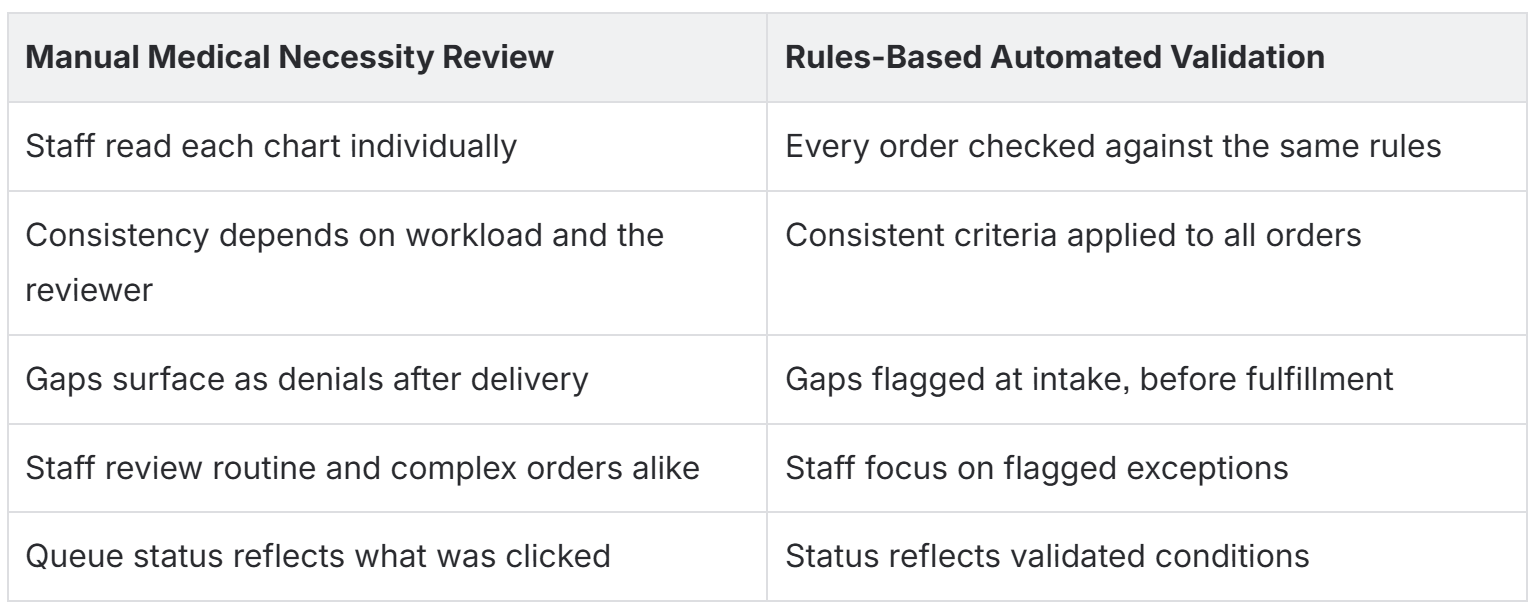
In practice, automation confirms the order is complete, matches the diagnosis against the payer's coverage policy for that HCPCS code, checks whether prior authorization is required, and confirms item-specific requirements are met. Orders that pass advance. Orders that fail route to staff with the specific problem attached, so the team spends its time on outreach and judgment calls instead of re-reading clean charts.
This layers into your existing system.
If you run Brightree, automation can validate conditions and drive WIP routing inside the workflow you already use, rather than requiring a replacement. A status tracker becomes a workflow engine only when the state changes are tied to validated conditions instead of manual clicks.
DME Medical Necessity FAQs
What is DME medical necessity in simple terms?
It's documented proof that a patient's diagnosed condition requires the equipment being billed. The order, the diagnosis, and the clinical notes have to agree and meet the payer's coverage criteria for that item.
Why do medical necessity denials happen so often?
Because the documentation gap usually exists before billing ever sees the order. A denial at billing is often the visible outcome of an incomplete order, a non-qualifying diagnosis, or a missing note captured at intake.
Can automation prove medical necessity by itself?
No. Automation validates that the required documentation is present, complete, and consistent with payer rules. People still handle missing-document outreach, referral-source coordination, and clinical ambiguity. The split is simple: automation handles the rules, staff handle the exceptions.
Does this require replacing Brightree?
No. Rules-based validation and routing can operate within your current Brightree workflows as an added layer, not a platform swap.
Where does validating medical necessity pay off fastest?
In high-volume, rules-heavy workflows like PAP, CGM, and recurring resupply, where the same checks repeat on every order and small documentation gaps multiply into denials at scale.
Where to Start:
You don't need to automate everything at once. Start where the denials are.
- Pull 60 to 90 days of medical necessity denials.
- Group them by payer and item to find the top patterns by volume and revenue.
- Trace each pattern to the upstream cause, usually a specific missing element at intake.
- Configure validation rules at that intake point for those items and payers.
- Route failed orders to an exception queue with the specific gap attached.
- Monitor the denial rate for those patterns, then expand once the rules stabilize.
Medical necessity isn't proven at billing. It's proven at intake, and the teams that validate it there stop paying for the same denials twice.
