
Bottom line: HME order intake automation validates documentation, eligibility, authorization requirements, and order setup before an order reaches fulfillment or billing. When those checks run at intake, preventable denials never enter the downstream workflow.
Rules-based automation applies them to every order so staff manage exceptions instead of confirming routine work.
Let’s dig into this idea a bit further…
What IS HME Order Intake Automation, Really?
In essence, HME order intake automation is a rules-based layer that reads incoming referrals, extracts the data your system needs, checks each order against payer and product requirements, and routes it to the right next step without a person keying and re-reviewing every field.
HME order intake automation covers the work between referral arrival and a fulfillable order: document capture from fax, portal, and e-prescribe channels, benefit-level eligibility confirmation, prior authorization identification, HCPCS and modifier alignment, and the decision about whether an order is complete enough to advance.
Intake staff already know what a clean PAP order requires. Automation applies that standard to every order, at every hour, regardless of who is working or how deep the queue is.
.webp)
Here’s the Problem: Eventually, Manual Intake Breaks Down
Manual intake tends to work at a low volume because one experienced coordinator can hold the payer rules in their head. It breaks, however, when order volume grows faster than headcount, because the per-order review time stays flat while the queue does not.
Three things happen as volume climbs:
- Review depth drops, so orders advance with documentation gaps nobody caught.
- Turnaround extends, so referral sources start routing patients elsewhere.
- And inconsistency widens, because two coordinators working the same fax apply slightly different standards.
None of that shows up as an intake problem. It reveals itself 45 days later as a denial, an appeal, or a write-off, in a department that had no ability to prevent it.
Billing cannot correct documentation that was never captured, right?
Okay, So What’s the Issue With Intake?
From what we’ve noticed, the specific failure points are consistent across providers:
- Demographics and insurance arrive as a fax image and get retyped into the system by hand
- The standard written order is missing, unsigned, or dated after the delivery date
- Chart notes do not support medical necessity for the item prescribed
- Eligibility is confirmed at the plan level but not the benefit level, so a coverage limit surfaces after delivery
- Prior authorization requirements are identified after the equipment is scheduled
- HCPCS selection and modifiers are set without checking the payer's current requirements
- Missing document requests go out without a specific ask, so the clinic returns the wrong page
- Orders sit in a pending documentation queue with no aging visibility and no escalation
Each one produces the same downstream result - an order either stalls without anyone noticing or advances with a defect that becomes a denial. Ouch.
What Does Rules-Based Automation Validate?
Automation is most useful where the criteria are already written down. At intake, that covers more ground than most teams assume:
- Document presence and type, including order, chart notes, and any product-specific study
- Signature and date logic against the intended delivery date
- Diagnosis code support for the item ordered
- Benefit-level eligibility, plan coverage, and deductible status
- Prior authorization triggers by payer, product, and HCPCS
- Quantity limits and units against the payer's allowable
- HCPCS and modifier combinations
- Order completeness before the order is released to scheduling
- Aging thresholds on held orders, with automatic escalation
Orders that clear every rule advance. Orders that fail one route to an exception queue with the specific defect named, so the coordinator who picks it up knows what to request and from whom.
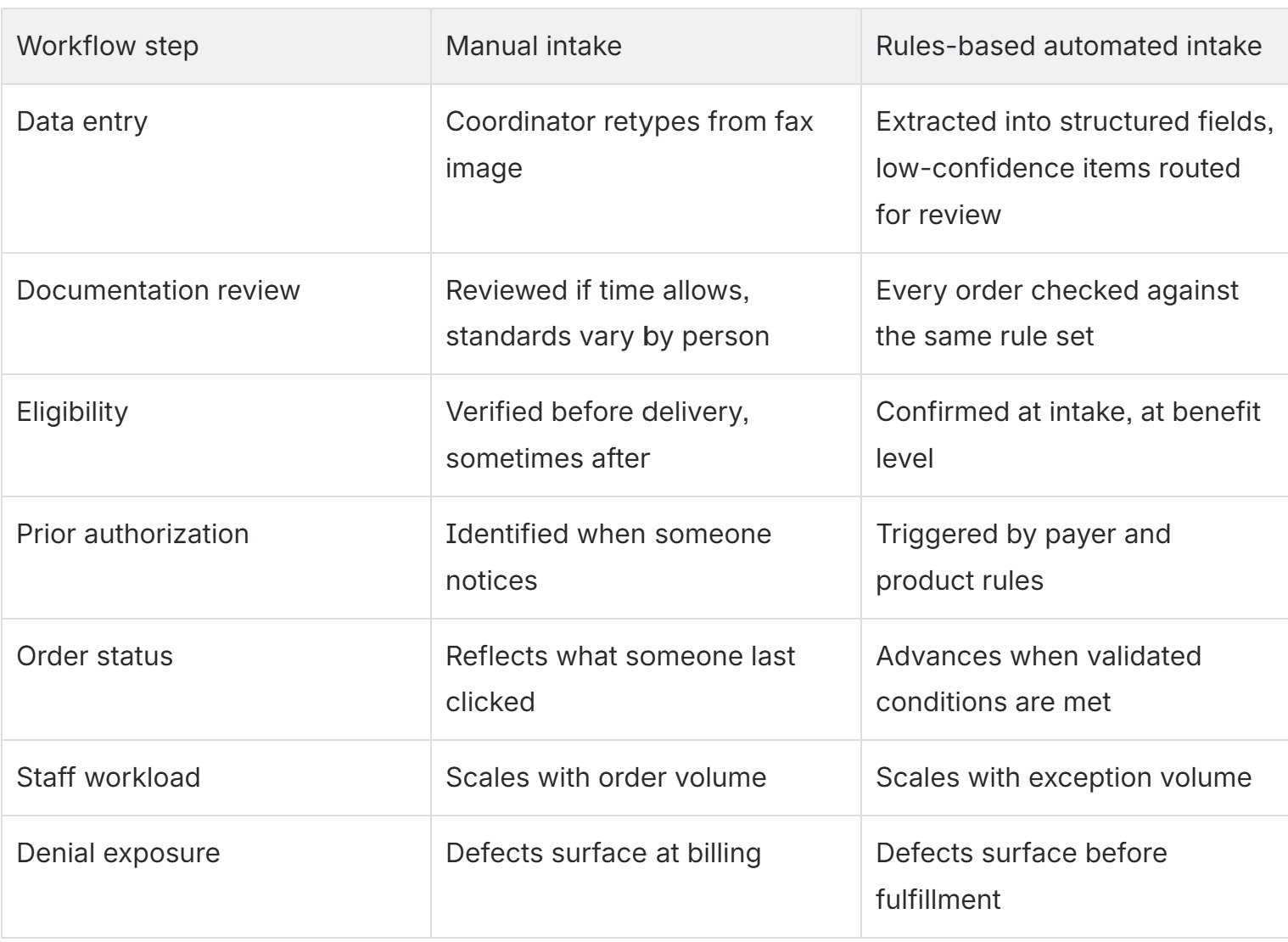
Manual Intake Versus Automated Intake
How Does Intake Automation Work Alongside Brightree
Brightree remains the system of record - order data, WIP states, worklists, and billing all continue to live there. Automation adds a validation and routing layer around those workflows rather than replacing them.
The practical gap it closes is state accuracy.
A WIP state tells you what someone last clicked, not whether the underlying conditions were actually met. An order can sit in a state that implies documentation is complete because a coordinator advanced it before the chart notes arrived. Queues look organized and the data is wrong.
Connecting state changes to validated conditions turns a status tracker into a workflow engine. An order moves to a fulfillment-ready state because the documentation, eligibility, and authorization checks passed, not because someone selected the state from a dropdown.
What Still Requires HUMAN Judgment?
Automation handles rules. It does not handle ambiguity. Humans need to remain responsible for the unpredictable. The result? Eperienced staff spend less time confirming routine orders and more time on the ones that need a decision.
What Does HME Order Automation Success Look Like?
Four measurements tell you whether intake automation changed anything:
- Manual touches per order, from referral receipt to fulfillment-ready
- Referral-to-delivery time in hours
- Percentage of orders held for documentation, and aging on those holds
- First-pass clean claim rate, plus denials tied specifically to documentation and authorization defects
If turnaround improves but documentation denials hold steady, the extraction is working and the rule set is incomplete.
HME Order Intake Automation FAQ
What does HME order intake automation actually automate?
Document capture and extraction, documentation completeness checks, benefit-level eligibility, prior authorization identification, coding and modifier validation, and order routing. It does not automate judgment calls on coverage ambiguity or outreach to referring physicians.
Does automation require replacing Brightree?
No. Automation layers onto Brightree as a validation and routing function. Orders, WIP states, and billing stay in Brightree, and the automation determines when an order is genuinely ready to advance.
How does intake automation reduce denials?
Most denials are the visible outcome of an intake defect. Validating documentation, eligibility, authorization, and coding before fulfillment keeps those defects out of the claim rather than correcting them after the fact.
Can a smaller HME team use intake automation?
Yes, and the capacity gain is often more noticeable. A small team spends a larger share of its time on repetitive order review, so removing manual touches frees a meaningful percentage of available hours.
Okay, You’re Interested. Where Should You Start?
- Pick your highest-friction product line, usually PAP or oxygen.
- Pull 60 to 90 days of denials and held orders from that line.
- Group the defects by volume and revenue impact.
- Trace the top patterns back to the intake step that created them.
- Configure validation and routing rules at that step, not at billing.
- Set aging thresholds and escalation on the exception queue.
- Monitor manual touches and documentation denials for a full billing cycle, then expand to the next product line.
- Or, before doing any of this, get in touch with intake automation experts - we’ll help you get started.
