
Bottom line: Brightree reporting tells you what already happened in your workflow - where orders sit, how claims performed, and where revenue slowed. It measures results well. However, it does not fix the upstream causes on its own. The value comes from reading the right reports, tracing each pattern to its source, and acting before the same problem repeats.
What is Brightree Reporting?
Brightree reporting is the set of standard and custom reports Brightree provides to track orders, claims, revenue, and workflow status across a DME operation. It covers WIP states, sales orders, A/R aging, denials, payments, resupply activity, and inventory, and it can be filtered by payer, location, branch, date range, etc.

For many DME teams, Brightree is THE system of record, so its reports can form a primary view of what the operation actually did. That makes reporting the potential starting point for nearly every operational decision: which queues are backed up, which payers deny most, where cash is stuck, and whether resupply is generating the orders it should.
These decisions and the information they are based on can make or break a DME.
Which Brightree Reports Matter Most for Operations?
Not every report earns a place in a weekly review. A few consistently answer the questions operators care about.
- WIP state reports: where orders sit and how long they have been there
- A/R aging: how much is outstanding and how old it is, by payer
- Denial reports: what is being denied, by reason and payer
- Sales order and revenue reports: what was ordered, delivered, and billed
- Resupply reports: eligible patients, generated orders, and quantity limits
- Payment and adjustment reports: what actually posted against what was billed
Read together, these show the health of the pipeline from intake through cash. Read in isolation, each one answers a narrow question and hides the connection between an intake gap and a downstream denial.
Why Brightree Reporting ALONE Won't Fix a Slow Workflow
Reporting measures outcomes. It does not change the process that produced them. A denial report tells you a claim was rejected for missing documentation. It does not stop the next order from going out with the same gap. That distinction matters, because teams often expect a report to solve a problem it can only describe.
There is a second limit. Many Brightree WIP states track what someone last clicked, not what is objectively true about the order. If a status depends on a rep updating a dropdown, the queue can look clean while orders stall underneath it. A report built on that status inherits the same blind spot. The number looks precise, but it reflects the last manual touch rather than the real condition of the order.
So the report is accurate about what was recorded. Whether what was recorded matches reality is a separate question, and it is usually where the actual problem lives.
How to Turn Brightree Reporting Into Action
A report is only useful if it changes what happens next. The pattern that works is consistent: read the report, find the concentration, trace it to the workflow stage that caused it, and put a rule or a check at that stage.
- A denial report shows one payer rejecting for a missing authorization. The fix belongs at intake, where the authorization should have triggered, not in billing.
- An A/R aging report shows a specific payer's claims aging past 60 days. The fix is a follow-up rule and a look at why those claims submit slowly.
- A WIP report shows orders parked in one state for days. The fix is finding what that state waits on and whether it can advance automatically once conditions are met.
Reporting points to the symptom. The action lives one step upstream. Teams that treat every report as a prompt to change a process, not just a number to note, get compounding improvement instead of a recurring status meeting.
How Automation Extends Brightree Reporting
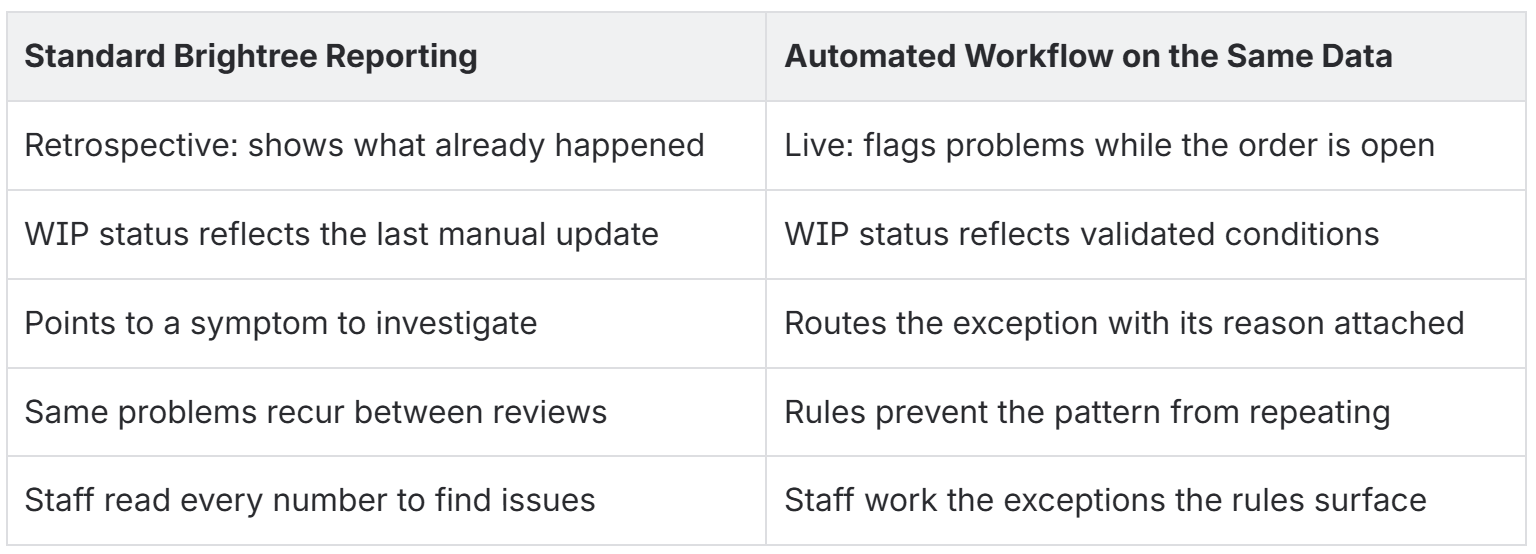
Standard reporting is retrospective. It tells you what happened after it happened. Rules-based automation works on the same data in the other direction: it applies checks while the order is live, so problems are flagged before they become the denial you would otherwise read about next week.
Automation validates documentation completeness at intake, confirms eligibility and authorization, applies payer-specific rules, and advances orders that pass every check. Orders that fail route to an exception queue with the reason attached. The reporting still tells you what happened, and now the WIP states reflect validated conditions instead of the last click, so the reports describe reality more closely.
The two work together. Automation improves the accuracy of the data reporting depends on, and reporting confirms whether the rules are producing the outcomes you expected. This layers onto existing Brightree workflows rather than replacing them.
Standard Reporting VS Automated Workflow
Brightree Reporting FAQs
What can Brightree reporting tell me about my operation?
It shows where orders sit in WIP, how claims performed, what is being denied and why, how old your A/R is by payer, and how resupply is tracking. It is the retrospective view of the full pipeline from intake through cash.
Why do my Brightree reports look clean when orders are still stuck?
Because many WIP states reflect the last manual update, not the order's real condition. If a status depends on someone remembering to change it, the report can show progress that has not actually happened.
Does improving reporting require replacing Brightree?
No. Better operational visibility comes from acting on the reports you have and from layering rules-based automation onto existing Brightree workflows, so the underlying status data is accurate. Brightree stays the system of record.
Which Brightree report should I start with?
Start with denials and A/R aging. Together they show where revenue is being lost and where it is stuck, and both trace back to specific upstream causes you can fix.
Can automation make Brightree reporting more accurate?
Yes. When state changes are tied to validated conditions instead of manual updates, WIP and status reports describe the real state of each order, so the numbers you review reflect what is actually true.
Where to Start:
You do not need a new reporting stack. You need a short, repeatable loop that turns the reports you already have into fewer recurring problems.
- Pick two reports to review weekly: denials and A/R aging.
- Sort each by payer and reason, and rank the patterns by volume and dollars.
- Trace the top pattern to the workflow stage that created it.
- Put a validation or routing rule at that stage.
- Confirm the WIP states feeding your reports reflect real conditions, not just manual updates.
- Re-check the same reports the following month to see if the pattern shrank.
- Move to the next pattern once the first is stable.
Brightree reporting is the clearest picture you have of what your operation did. Its full value shows up when each report changes something upstream, so the next report has less to flag.
